Home and Device Entry
After logging in, you enter the home page by default.
Main Home Page Entries
The upper-right area of the home page provides several feature entries:
- Electronic Skin: Enter the tactile pressure data visualization page to view the end-effector contact status.
- Remote Teleoperation: Enter the two teleoperation modes for the leader arm / follower arm.
- URDF Loader: Enter custom model loading and simulation control.
- Scan Devices: Enter the new device scanning and onboarding flow.
- Personal Center: Click the avatar to enter the account and billing management page.
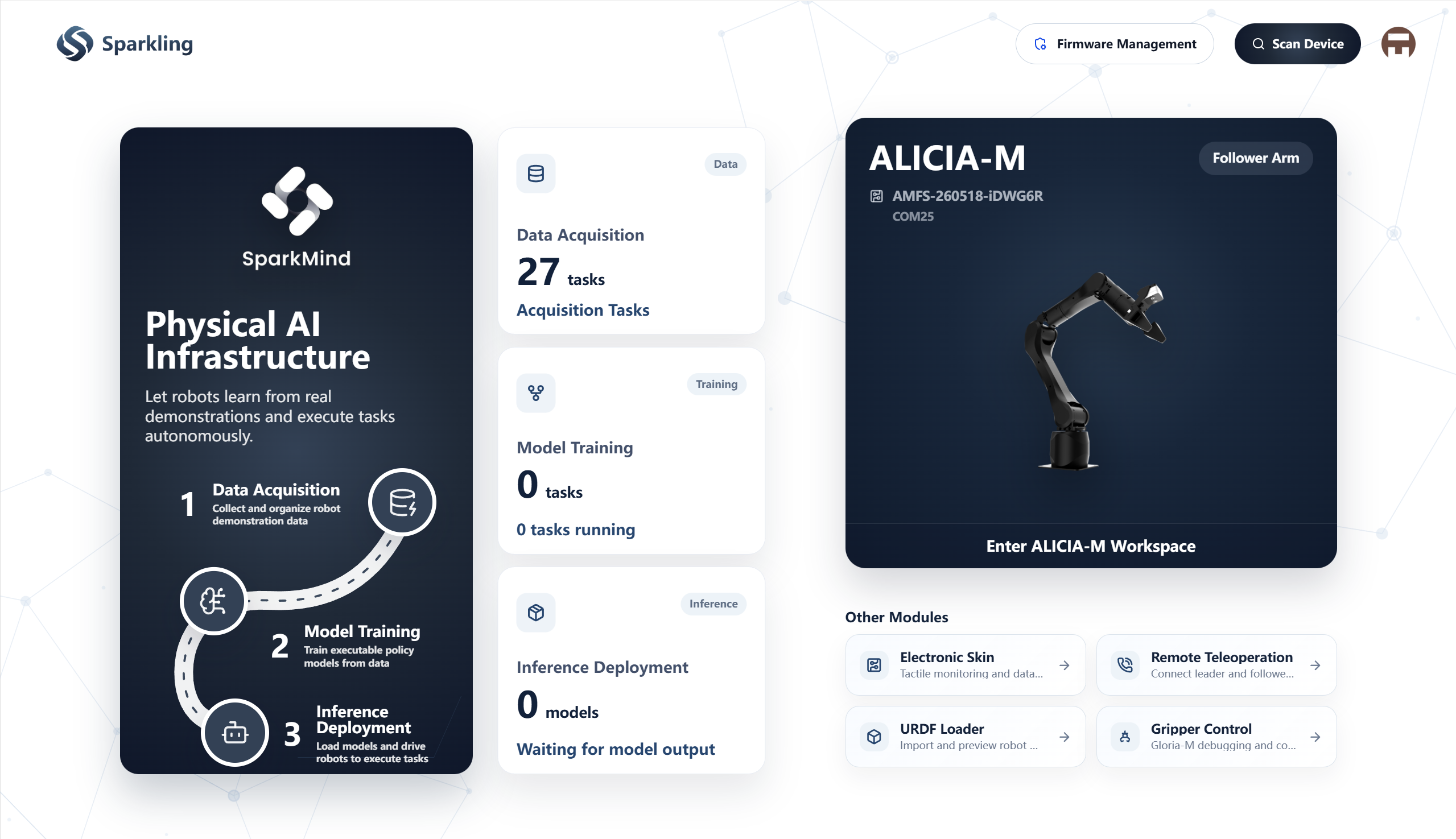
Device List
The center of the home page displays the currently detected device list in card form, supporting horizontal browsing:
- Displays basic information such as device ID / serial number.
- After selecting a device, it automatically enters the corresponding page based on the device type:
- Follower Arm: Enter the single-arm control page.
- Leader Arm: Enter the dual-arm control page.
- On first startup, the software performs a local service health check and initialization.
- When not logged in as a guest, the software automatically checks for updates after entering the home page.
Scan Devices
After clicking "Scan Devices", you enter the device scanning page:
- Scan for new devices that can currently be onboarded.
- Provides troubleshooting suggestions for USB connection, power status, and more.
- After successful detection, you can directly continue to add the device.